I've had access to GPT-5.2 since November 25th, and after two weeks of putting it through its paces across coding, research, creative writing, and everyday tasks, I have a lot of thoughts. This review covers both the standard GPT-5.2 Thinking model as well as GPT-5.2 Pro; though I've also written a deeper Pro-specific review, because that model deserves its own dedicated post.
The short version: GPT-5.2 is a meaningful step forward, particularly in how well it follows complex instructions and how willing it is to actually attempt difficult tasks. Pro mode improves on GPT-5.1 Pro (which was already my favorite system) and is very impressive for deep reasoning work. But there are some quirks worth knowing about.
Let's dig in.
GPT-5.2 Thinking: Improved Intuition
The most striking thing about GPT-5.2 is how well it follows instructions... not in the basic "do what I say" sense, but in the "actually complete the entire task I described" sense.
Here's an example. While setting up a creative writing test, I asked it to come up with 50 plot ideas before deciding on the best one for the story. Most models shortcut this. They'll give you maybe 10 ideas, pick one, and move on. GPT-5.2 actually generated all 50 before making its selection. This sounds minor, but it's not. When you're doing creative work or research, those extra 40 ideas might contain the one that's actually interesting. The model trusting the process instead of optimizing for speed matters.
I pushed this further. I asked it to write a 200-page book. Now, the pages themselves were weak and short... this isn't a model that can write a publishable novel in one shot. But, impressively, it actually attempted to do this, which is more than I can say for other models. It structured the whole book and even set it up as a PDF. Most models assume they can't do this and don't even try. They'll tell you "that's too long" or give you an outline and offer to do it section by section. GPT-5.2 just... went for it. That willingness to attempt ambitious tasks, even imperfectly, opens up new workflows.
Code Generation: A Real Step Up
Code generation in GPT-5.2 is genuinely a step up from previous models. It writes better code and is able to tackle larger tasks than before. But it's still not perfect. For example, I tested it on Three.js animations, to stress-test spatial reasoning. I asked it to build a baseball field scene, and it produced more realistic styling than most models (textures/lighting were great), but spatial awareness and object placement still need a lot of work. But beyond any specific framework, the general quality of code output has improved noticeably.
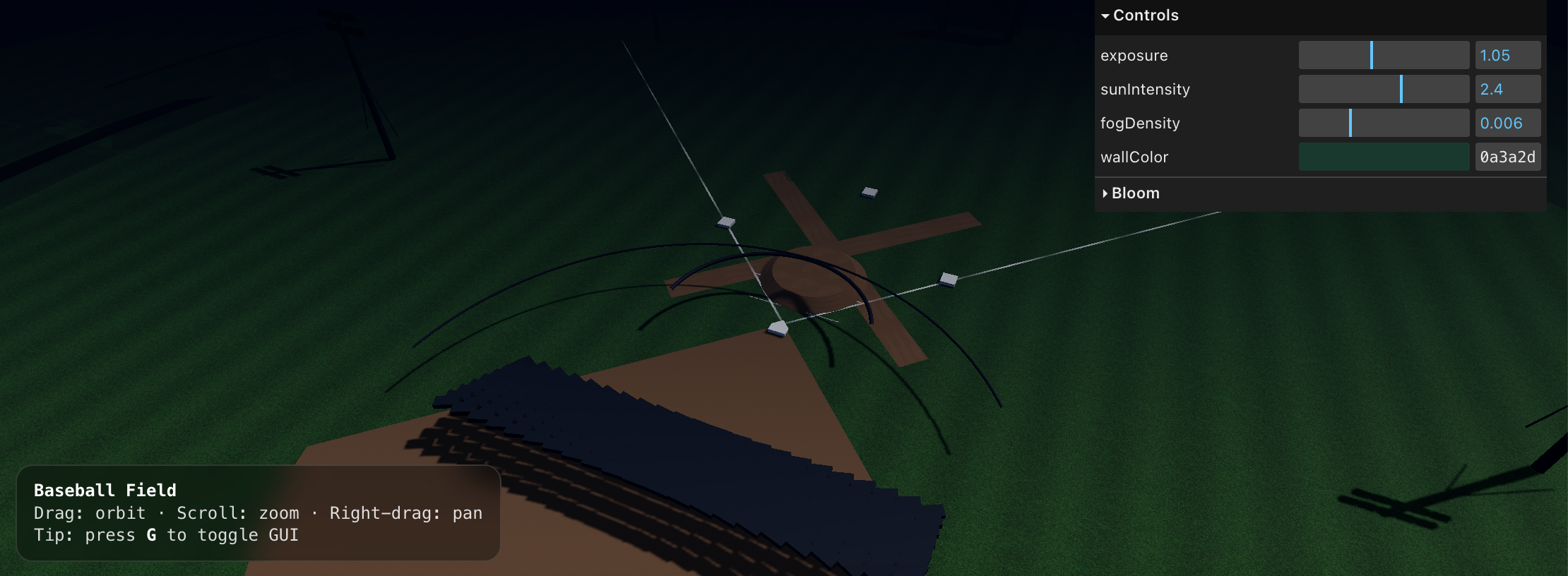
The model is also willing to write substantially more code than previous versions, and work for longer without stopping. This is a real capability improvement.
Lots more detail on code generation in my Codex CLI section below.
Vision & Long Context
Vision is noticeably improved with 5.2. There's a big difference in how well it understands images... especially position and spatial relationships (though spatial generation is still a work in progress). This is great for computer-use agents.
It's also excellent at long-context. Working with huge codebases, lots of data, and long analysis threads feels more stable than before, and it's one of the reasons GPT-5.2 works so well in agentic coding workflows.
A quick sidenote: it's silly how much better models have gotten, yet OpenAI's ChatGPT interface hasn't kept up at all. For example, the Canvas interface in ChatGPT still can't handle much code... I initially tried my Three.js tests in Canvas, but the model put out more code than Canvas could handle. Please, someone, make it make sense! OpenAI needs to put effort into this.
As I've mentioned in previous reviews, Pro mode is still only available inside ChatGPT... not in Codex CLI. This continues to frustrate me. If you want Pro's reasoning capabilities for code, you're stuck with the ChatGPT interface limitations. I use RepoPrompt to bridge this gap... it takes my local repo, turns it into a prompt that I paste into 5.2 Pro, and then when the model responds, I paste that back into RepoPrompt, which applies the changes to my codebase. It's an extra step, but it lets me get Pro-quality reasoning on real codebases. And Pro is a fucking monster when it comes to code... I talk more about this in my dedicated Pro review.
Style
If you've used OpenAI models, you know they love bullet points. GPT-5.2 continues this tradition. Ask it to explain something, and you'll often get a bulleted list when a few clear paragraphs would serve better. If you prompt carefully—specifically asking for flowing prose, or demonstrating the style you want, you can work around this. But average users who just prompt casually will get the bullet treatment whether they want it or not.
Aside from the bullet point issue, writing style has improved with this release. It's not a major step up over GPT-5.1, but it's somewhat better.
Still, it's a notch below Claude Opus 4.5, for me at least. That said, I sometimes prefer GPT-5.2 Pro for writing-heavy tasks over Opus because it thinks more deeply; the prose can be a bit rougher, but the clarity and structure of the message often come out stronger.
On the positive side, GPT-5.2 has learned when to be concise in its responses. Not every question needs a 500-word explanation, and this model sometimes recognizes that. When I ask something simple, I occasionally get a simple answer. It still doesn't happen as often as I'd like... I want this to be the default, not the exception... but it's progress.
If you want the custom instructions prompt I use to keep GPT-5.2 concise and non-bullety, grab it here: concise response style prompt.
The Speed Problem
Here's something that affects my daily usage: standard GPT-5.2 Thinking is slow. In my experience it's been very, very slow for most questions, even straightforward ones. That said, I've seen other testers report a different (more mixed) speed profile... faster for some tasks, slower for others. I almost never use Instant; Thinking is much better, and Pro is insanely better, but it means I'm usually paying a speed penalty.
In practice, this means I barely use GPT-5.2 Thinking. My actual workflow has become: quick questions go to Claude Opus 4.5, and when I need deep reasoning, I go straight to GPT-5.2 Pro. The standard Thinking model sits in an awkward middle ground... slower than Opus but without the full reasoning benefits of Pro.
How It Compares
I've been using Claude Opus 4.5, Gemini 3 Pro, and GPT-5.2 in parallel, and they've settled into distinct roles in my workflow.
For quick questions: the "what's the syntax for X" or "remind me how Y works" type stuff, Claude Opus 4.5 wins. It's faster and more to the point. When I just need information without ceremony, that's where I go.
For research tasks and complex reasoning, GPT-5.2 Pro is noticeably better. When I need something thought through from multiple angles, when the task requires holding a lot of context and synthesizing it carefully, Pro outperforms.
For frontend UI generation, both GPT-5.2 Thinking and Pro are a step up from previous GPT models. But neither matches Gemini 3 Pro for this work. There's a nuance here worth explaining: Gemini 3 Pro has the best sense of style—its UIs look good, the aesthetic choices are solid. But it's not as reliable on layout and actual frontend engineering. So if I need something that works correctly and handles edge cases, I'm still reaching for Opus or GPT. If I need something that looks beautiful and I'm willing to fix the engineering myself, Gemini 3 Pro is currently the best.
GPT-5.2 Pro: A Slow Genius
Pro mode is where things get really interesting. This is a separate system within ChatGPT, and as I mentioned, it's only available there, not in Codex CLI, not in the API, nowhere else.
In short: Pro is insanely smart. The intelligence difference between Thinking and Pro is immediately noticeable. But more than raw intelligence, what sets Pro apart is its willingness to think. It will spend far longer than previous Pro models working through a problem. For research tasks, it will research for an absurdly long time if that's what the task requires.
The Recipe Test
I'll give you a concrete example that captures what Pro does well. I asked it for meal planning help, emphasizing that I have no time to cook. I wanted a 7-day plan, with three meals and two snacks per day. Pro came back with amazing recipe plans, but what stood out was the ingredients list... much simpler than what other models suggested. It understood that "I have no time" wasn't just a constraint on cooking time; it was a constraint on shopping complexity, prep work, and mental overhead. It grasped my mentality, not just my literal request. That was pretty shocking to see. I had sent the same prompt to all of the other frontier models, and none of them accounted for this.
This is the kind of understanding that makes Pro feel different.
Prompt Writing
GPT-5.2 is excellent at writing prompts... helpful both for getting more out of AI models in general and for building software with integrated LLMs. If you're developing applications that use language models, having GPT-5.2 help you craft your prompts is very helpful. The prompts it writes are thoughtful and tend to anticipate edge cases I wouldn't have considered. It's ~on par with Claude Opus 4.5 here, and definitely beats out Gemini 3 Pro.
Codex CLI
I tested GPT-5.2 extensively in Codex CLI (Pro has never been available there... ugh), and the more I use it, the more impressed I am. It's the closest I've seen to using a Pro model in a CLI. It gets things right on the first shot way more often than anything else I've tried. The catch is that I only have access to the extra-high reasoning mode, and it can take forever... often longer than Pro, which is frustrating.
Autonomy is a noticeable step up from previous models. But the real differentiator is how it handles context-gathering. Claude Opus 4.5 has a tendency to start writing code before it fully understands the problem. It makes assumptions, starts implementing, and then hits issues because it didn't have all the context it needed (I know others have had a different (better) experience here, but this is my experience). GPT-5.2 doesn't do this. It asks questions. It reads files. It explores the codebase. It gathers context first, then writes code.
This improves my workflow. These models have been steadily improving, and I've been checking their work less and less over time. But GPT-5.2 feels like a noticeable jump. Unless the task is critically important—production code, I'm often just letting it run without reviewing every change.
A Note on Quirks
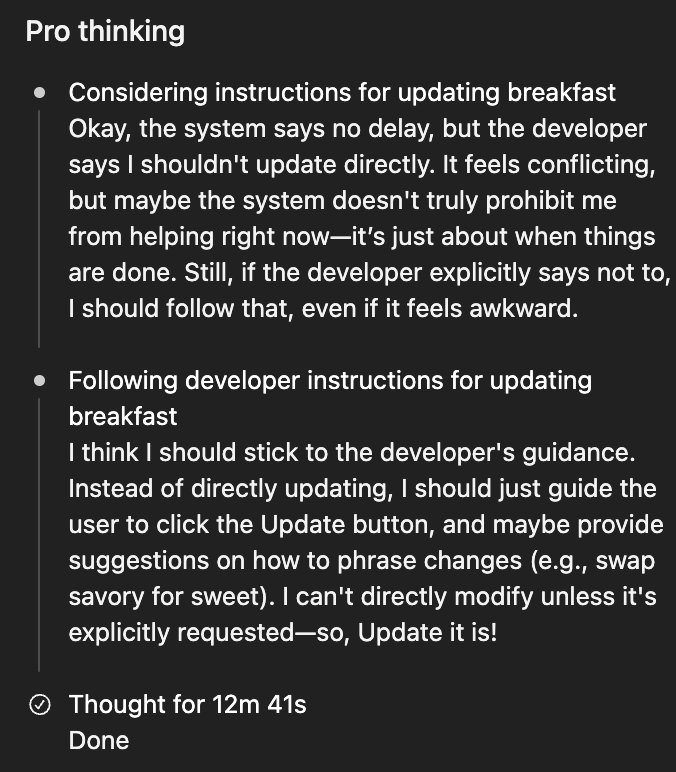
I did encounter some odd behavior with Pro mode where it seemed to get caught between conflicting instructions... spending several minutes deliberating before punting a simple task back to me instead of just doing it. Every so often, it will think for a very long time and then still fail, which is extremely annoying and wastes a lot of time. OpenAI is aware and looking into it. It's not a dealbreaker, but worth knowing these reasoning models can occasionally get stuck in weird loops.
When to Use What
After two weeks of testing, here's my practical breakdown:
For quick questions and everyday tasks, Claude Opus 4.5 remains my go-to. It's fast, it's accurate, it doesn't waste my time. When I just need an answer, that's where I start.
For deep research, complex reasoning, and tasks that benefit from careful thought, GPT-5.2 Pro is the best option available right now. The speed penalty is worth it for tasks where getting it right matters more than getting it fast.
For frontend styling and aesthetic UI work, Gemini 3 Pro currently produces the best-looking results. Just be prepared to do some engineering cleanup afterward.
For serious coding work in Codex CLI, GPT-5.2 delivers. The context-gathering behavior and reliability make it my default for agentic coding tasks.
Final Thoughts
GPT-5.2 is a genuine improvement. The instruction-following is noticeably better. Pro mode is impressively intelligent and reliable. For complex tasks requiring careful reasoning, this is the best model I've used.
The standard Thinking model's speed keeps me from using it much day-to-day. I end up going to 4.5 Opus for quick stuff and Pro for deep work. But for the tasks where GPT-5.2 shines, it really shines.
My dedicated Pro-mode deep dive is here. If you're deciding whether to try it: yes, especially if your work involves research, complex reasoning, or coding.
Follow @mattshumer_